
Your server’s roles,
on one living board.
RostaBot turns your roles into a self-updating board showing each role’s contacts, recruitment status, and members. Anyone can request to join an open role with a single click, approved right in DMs.
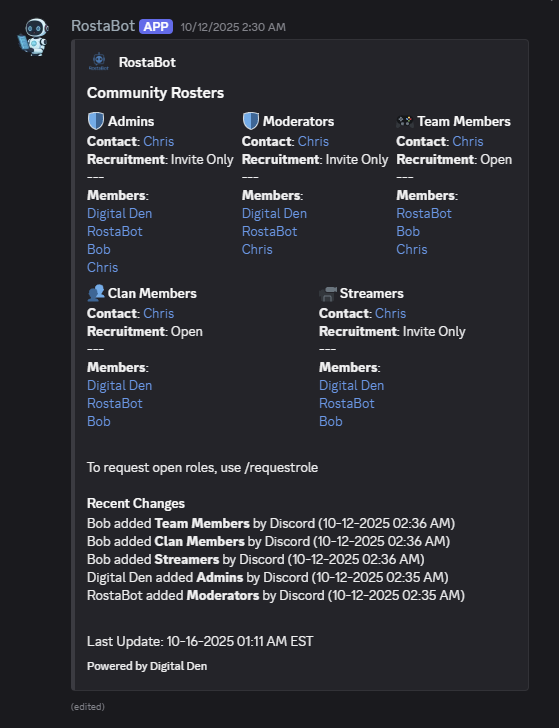
Set it up once. It keeps itself current.
Most bots solve role management by handing out risky permissions. RostaBot gives the right people just enough control, and does the busywork for you.
- 1
Track your roles
Run
/newembedto post a board, then/trackrolefor each role to set its contacts, emoji, and recruitment status. A clean card appears for every role. - 2
Members request to join
Anyone can click Request Role (or run
/requestrole) on an open role. The request is DMed to all of that role’s contacts with Approve / Decline buttons. - 3
Approve once, the rest is automatic
One approval assigns the role and updates the board instantly. It also re-syncs whenever roles change in Discord, so your roster is never out of date.
Everything a living roster needs
Built for communities, teams, factions, guilds, departments, and any server that needs to show who runs a role and how to join it.
Live role board
An auto-updating embed of your tracked roles, each shown as a card with its emoji, contacts, status, and members.
Up to 5 contacts per role
Assign as many as five people to a role. Join requests fan out to every one of them, so approvals never stall.
One-click join requests
A Request Role button (or /requestrole) lets members ask to join open roles. The whole approval flow happens in DMs.
Recruitment status
Mark each role Open, Invite Only, or Closed. Only open roles can be requested, so the board doubles as a recruiting signal.
Apply gates
Require members to already hold a role, server-wide or per role, before they can request. Keeps applications qualified.
Automatic member sync
The board follows Discord role changes in real time, and contacts or admins can add or remove listed members by hand too.
Multiple boards & layouts
Organize roles across several boards and channels. Choose 1, 2, or 3 cards per row, custom titles, sort order, and toggles.
Recent-changes log
See recent joins and removals right on the board, and pull the last 20 role changes for the whole server on demand.
Safe by design
No admin permissions, no accidental pings, and safe handling of member names. Resilient to Discord hiccups, so nothing gets untracked by mistake.
Watch RostaBot work
These walkthroughs are from earlier beta versions (v1 and v2), so a few details have moved on since. A full walkthrough of the current release is on the way.
Every command, grouped by who can use it
Clean slash commands with sensible permission gates. Most members only ever tap the Request Role button. The rest is for the people running the board.
Everyone
Any member of your server/helpPrivate help: getting-started steps, your server’s plan limits, and support links./premiumSee what RostaBot Premium includes and how to subscribe./requestroleRequest to be added to a tracked, open role./cancelrequestroleCancel a pending role request you submitted./reviewLeave a review for RostaBot on Top.gg.Role contacts or admins
The people who manage a role/memaddAdd a member to a tracked role’s list./memremRemove a member from a tracked role’s list./modemojiChange the emoji shown for a tracked role.Admins
Staff with the Manage Roles permission/newembedCreate a new Role Tracker board in the current channel./trackroleStart tracking a role: assign contact(s), an emoji, recruitment mode, and which board it shows on./untrackroleStop tracking a role (remove it from a board)./renameembedRename a board’s title./delembedDelete a board (and optionally its message)./perrowSet how many role cards show per row (1, 2, or 3)./sortrolesSet a board’s role order (as-added, alphabetical, or unsorted)./recentchangesShow or hide the Recent Changes section on a board./togglerequestbuttonShow or hide the Request Role button on a board./togglerequestroleSet a role’s recruitment mode: Open, Invite Only, or Closed./applygateRequire members to hold a role (server-wide and/or per-role) before they can request./rolesyncAudit tracked roles for orphaned entries and optionally clean them up./rolechangesShow the last 20 role changes for this server.Server administrators
Full Administrator permission/adminstatsShow this server’s current usage and limit info.Free to run. Premium when you grow.
Limits are per Discord server and cover how many boards you can run, how many roles each server can track, and how many members are listed per role.
Everything you need to set up a board and see RostaBot working.
- 1Role Tracker board
- 3tracked roles
- 8members listed / role
- One-click join requests & DM approvals
- Up to 5 contacts per role
- Apply gates & recruitment status
- Automatic, real-time board sync
Room to run your whole server, with the same live boards and one-click join requests scaled up.
- 10Role Tracker boards
- 50tracked roles
- 25members listed / role
- Everything in Free, scaled up
- 10× the boards, 16× the tracked roles
- Spread boards across channels & categories
- Built for large, active communities
“Members listed per role” is how many names appear on a board. A role can have more members in Discord than are shown. Need custom limits, a sponsorship, or a partnership? Open a support ticket or use the Digital Den contact form.
Frequently asked questions
- What is RostaBot?
- RostaBot turns your Discord server’s roles into a living Role Tracker board. For each tracked role, the board shows its contacts, its recruitment status, and its current members, and anyone can request to join open roles with one click. The board stays in sync automatically as members gain or lose roles. It’s verified on Top.gg and Discord and listed in the Discord App Directory.
- Is RostaBot free to use?
- Yes. The Free plan includes 1 board, 3 tracked roles, and 8 members listed per role, with nothing paywalled. RostaBot Premium is available for $4.99/month with much higher limits (10 boards, 50 tracked roles, and 25 members per role), bought directly through Discord as a server subscription from RostaBot’s profile. See Plans.
- How do members join a role?
- A member clicks the Request Role button on the board (or runs
/requestrole) and picks an open role. The request is DMed to all of that role’s contacts with Approve and Decline buttons; when one approves, RostaBot assigns the role automatically and notifies the requester. Closed and Invite Only roles can’t be requested. - How do I add RostaBot to my Discord server?
- Use the Add to Discord button and complete Discord’s authorization flow. RostaBot needs View Channel, Send Messages, Embed Links, and Manage Roles in the channels you use. Make sure RostaBot’s role sits above any role it will assign, then run
/newembedand/trackrole. - How many contacts can a role have?
- Each tracked role can have up to 5 contacts. When a member requests the role, the request fans out to all of them, and any one can approve or decline it from their DMs, so approvals never wait on a single person.
- What is an apply gate?
- An apply gate requires a member to already hold a specific role before they can request another. You can set it server-wide or per role with
/applygate, so only qualified members can submit requests for the roles you choose. - Is RostaBot safe? What permissions does it need?
- Yes. RostaBot needs no administrator permissions, just View Channel, Send Messages, Embed Links, and Manage Roles. Role control is handled by per-role contacts rather than global permissions, member names are handled safely with no injected links, and the board is resilient to transient Discord errors so nothing is untracked by mistake. RostaBot is verified on Top.gg and Discord.
- Can I track multiple roles across multiple boards?
- Yes. The Free plan gives you 1 board with up to 3 tracked roles; Premium raises this to 10 boards and 50 tracked roles. Each board can live in its own channel with its own layout: 1, 2, or 3 cards per row, a custom title, sort order, and toggles for the Recent Changes section and Request Role button. See Plans.
- Where do I get support?
- All support is handled exclusively in the RostaBot support Discord, which is also where changelogs, downtime notices, and feature requests live. If something isn’t working or a feature is missing, reach out there before leaving a negative review. We’d rather fix it. Limited sponsorship and partnership slots may be available via a support ticket.
A polished tool, shipped and supported like a product
RostaBot is built and operated by Digital Den. It began as a fix for a familiar headache: role management that meant either handing out risky permissions or maintaining rosters by hand. It grew, on community feedback, into a full Role Tracker with a one-click request flow. We ship updates continuously, run all support directly through Discord, and would always rather fix a problem or build a missing feature than lose you. RostaBot is free to use, with an optional Premium subscription for larger communities.
Live in under a minute
Free to add, with no admin permissions required. Your role management gets better the moment you invite it.
- 1Add RostaBot
Invite it with the four permissions it needs (below).
- 2Fix the role hierarchy
Move RostaBot’s role above any role it will assign.
- 3Create a board
Run
/newembedin your target channel. - 4Track your roles
Run
/trackrolefor each role to set contacts, emoji, and recruitment mode. - 5Open it up
Toggle the Request Role button and add an
/applygateif you like. Members can now join with one click.